


In my previous blog on Optimizing ClickHouse Queries, we explored how ClickHouse stores data in granules and when to use data skipping indexes and projections to reduce unnecessary full-table scans. If you haven’t read it yet, you can find it here:
👉 Optimizing ClickHouse Queries: From Data Skipping Indexes to Projections
Now, In this follow-up Blog, we focus on adding and benchmarking projections in ClickHouse to measure real performance improvements. The goal is to design projections, benchmark query performance before and after optimization, and verify how ClickHouse chooses projection over scanning the entire fact table.
This article covers:
- Identifying frequent aggregation queries.
- Designing and applying projections.
- Before and after performance benchmarks.
- Checking optimizer behavior using
EXPLAIN. - What happens when projections are removed (fallback behavior).
All experiments in this blog, uses the previously defined uk.uk_price_paid_fact table. Keeping the dataset constant helps us measure performance changes accurately.
Identifying Frequent Aggregation Queries
The first step in optimizing ClickHouse queries using projections is finding repeated aggregation patterns.
Such patterns can be identified either by analyzing common business or reporting queries, or by examining historical query logs
From query logs and workload analysis, we observed frequent queries like:
SELECT
    query,
    read_rows
FROM system.query_log
WHERE (type = 'QueryFinish') AND (query ILIKE '%uk_price_paid_fact%')
ORDER BY read_rows DESC
LIMIT 10
Query 1 — Average Price per County
SELECT county, avg(price)
FROM uk.uk_price_paid_fact
GROUP BY county;
Query 2 — Monthly Sales Trend
SELECT toStartOfMonth(date) AS month, sum(price)
FROM uk.uk_price_paid_fact
GROUP BY month;
Query 3 — Postcode-Level Analysis
SELECT postcode1, postcode2, avg(price)
FROM uk.uk_price_paid_fact
GROUP BY postcode1, postcode2;
All these queries use aggregation functions. In addition, they scan large portions of the fact table. Because they run frequently in reporting workloads, they are perfect candidates for projections.
Baseline Benchmark (Without Projection)
Before adding a projection, we measure the baseline performance.
Disable projections if already enabled:
SET allow_experimental_projection_optimization = 0;Next, run one of the heavy queries:
EX: SELECT postcode1, postcode2, avg(price)
    FROM uk.uk_price_paid_fact
    GROUP BY postcode1, postcode2;
you’ll observe results similar to,
Baseline Results

- Rows processed: ~30 million
- Execution time: ~1.5 seconds
- Memory usage: High
This clearly shows that ClickHouse is scanning the entire table.
Designing the Projection
To improve performance, we create a projection that pre-aggregates postcode-level data.
ALTER TABLE uk.uk_price_paid_fact
ADD PROJECTION proj_postcode_metrics
(
    SELECT
        postcode1,
        postcode2,
        count() AS total_sales,
        sum(price) AS total_value,
        avg(price) AS avg_price
    GROUP BY
        postcode1,
        postcode2
);
Materializing the Projection
After creation, materialize it:
ALTER TABLE uk.uk_price_paid_fact
MATERIALIZE PROJECTION proj_postcode_metrics;
This step makes sure older data also uses the projection.
Verifying the Projection
To confirm that the projection exists, run:
SELECT *
FROM system.projections
WHERE database = 'uk'
AND table = 'uk_price_paid_fact';
Alternatively:
SHOW CREATE TABLE uk.uk_price_paid_fact;You should see proj_postcode_metrics listed in the table definition.
Benchmark After Adding the Projection
Now enable projection optimization:
SET allow_experimental_projection_optimization = 1;Run the same query again:
SELECT postcode1, postcode2, avg(price)
FROM uk.uk_price_paid_fact
GROUP BY postcode1, postcode2;
This time, the results shows:
Optimized Results

- Rows processed: ~1.33 million
- Execution time: ~0.532 seconds
- Memory usage: Lower
As a result, performance improves noticeably.
Verifying Optimizer with EXPLAIN
To confirm that ClickHouse uses the projection, run:
EXPLAIN
SELECT postcode1, postcode2, avg(price)
FROM uk.uk_price_paid_fact
GROUP BY postcode1, postcode2;
The output should include: ReadFromMergeTree (proj_postcode_metrics)
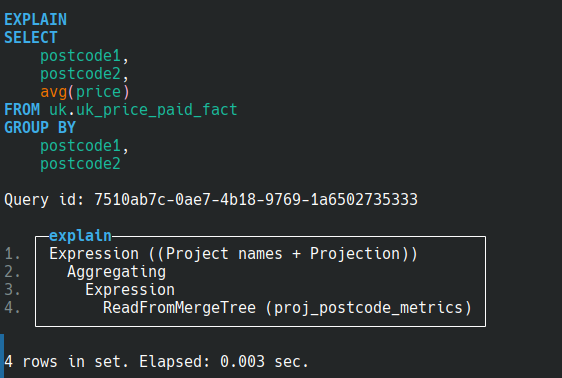
This confirms that ClickHouse reads from the projection instead of the base table.
Drop the Projection and observe Behavior
Next, remove the projection:
ALTER TABLE uk.uk_price_paid_fact
DROP PROJECTION proj_postcode_metrics;
Run the query again.
Result:

- Back to ~30 million rows
- Slower execution
- Higher memory usage
This clearly demonstrates how projections eliminate repeated aggregation work.
Final Benchmark Comparison
| Scenario | Rows Read | Time | Memory |
|---|---|---|---|
| No Projection | ~30M | Slow | High |
| Projection Enabled | ~1.33M | Fast | Low |
| Projection Dropped | ~30M | Slow | High |
Note: Projections are fully customizable and should be designed based on specific workload patterns, query frequency, and aggregation requirements.
Key Learnings
Optimizing ClickHouse queries using projections is about eliminating repeated aggregation work.
- Projections store pre-aggregated data.
- Optimizer automatically selects them.
- They dramatically reduce rows scanned.
- Dropping them forces full-table scans again.
Conclusion
Projections improve performance by reducing repeated calculations. Instead of scanning the full table, ClickHouse reads prepared results from the projection. Because of this, fewer rows are processed and memory usage drops.
When projections are removed, queries scan the entire table again. As a result, execution time increases and more memory is used. Overall, this clearly shows how helpful projections are optimizing large-scale analytical workloads. Overall, adding and benchmarking projections in ClickHouse provides measurable improvements in query speed and resource usage.
What’s Next?
In the next blog, we will explore data skipping indexes in more detail, including:
- Adding and configuring
minmax,set, andbloom_filterindexes - Choosing the right index strategy for different query patterns
- Comparing performance before and after adding indexes
- Measuring granule-level data skipping
Stay tuned for the next post in this series.
Reference
Projections in ClickHouse – https://clickhouse.com/docs/data-modeling/projections
Projections as Secondary Indexes – https://clickhouse.com/blog/projections-secondary-indices
Performance Introspection EXPLAIN Clause – https://clickhouse.com/docs/en/sql-reference/statements/explain