


Optimizing ClickHouse Queries requires a clear understanding of how ClickHouse stores data and how it decides what data to read. In this blog, we’ll walk through a real optimization journey, starting from ClickHouse’s storage model, identifying slow queries, and finally fixing them using data skipping indexes and projections, backed by real query logs and experiments.
1. Understanding How ClickHouse Stores Data
Before talking about indexes or projections, we must understand how data is physically stored from Inserts to Disk,
When data is inserted into ClickHouse:
- Data is written into parts.
- Each part is stored in columnar format.
- Each column is split into granules.
- Each granule contains 8192 rows (by default)
Granule is the smallest unit , ClickHouse reads from disk.
ClickHouse never reads individual rows. It always reads entire granules.
2. What Is a Granule ?
A granule (also called a block):
- Contains 8192 rows ( Configurable )
- Exists per column
- Has metadata like min/max values ( for some indexes )
- Is either read fully or skipped fully
Example:
- Granule 1 → rows 1–8192
- Granule 2 → rows 8193–16384
- Granule 3 → rows 16385–24576
If even one row in a granule might match the query, ClickHouse must read the entire granule.
So optimization = skip as many granules as possible
3. How Data Skipping Works Internally
When a query runs, ClickHouse follows this decision flow:
- Check metadata (indexes, projections, primary key)
- Decide which granules can be skipped
- Read only the required granules
- Apply filters on actual rows
Skipping happens before disk reads, which is why it’s so powerful.
4. The Example Dataset: UK Price Paid Fact Table
We’ll use a realistic analytical fact table:
CREATE TABLE uk.uk_price_paid_fact
(
    price UInt32,
    date Date,
    postcode1 LowCardinality(String),
    postcode2 LowCardinality(String),
    type Enum8(
        'terraced' = 1,
        'semi-detached' = 2,
        'detached' = 3,
        'flat' = 4,
        'other' = 0
    ),
    is_new UInt8,
    duration Enum8(
        'freehold' = 1,
        'leasehold' = 2,
        'unknown' = 0
    ),
    addr1 String,
    addr2 String,
    street LowCardinality(String),
    locality LowCardinality(String),
    town LowCardinality(String),
    district LowCardinality(String),
    county LowCardinality(String)
)
ENGINE = MergeTree
ORDER BY (postcode1, postcode2, addr1, addr2);
Why ORDER BY Is Critical
- Data is physically sorted by
(postcode1, postcode2, addr1, addr2). - ClickHouse can efficiently skip data only when queries filter on these columns.
- Filters on other Columns such as
town,price,date,countyare not optimized by default.
This design choice directly impacts query performance.
5. Running Analytical Queries
Let’s execute realistic analytical queries such as:
SELECT avg(price)
FROM uk.uk_price_paid_fact
WHERE town = 'ST ALBANS';

SELECT county, avg(price)
FROM uk.uk_price_paid_fact
GROUP BY county;

SELECT count()
FROM uk.uk_price_paid_fact
WHERE price > 500000;
These queries are common in dashboards and reports.
However, they all:
- Filter or group by columns not in ORDER BY
- Force ClickHouse to scan almost the entire table
6. Identifying Heavy Queries from Logs
SELECT
    query,
    read_rows
FROM system.query_log
WHERE query LIKE '%uk_price_paid_fact%'
ORDER BY read_rows DESC
LIMIT 10;
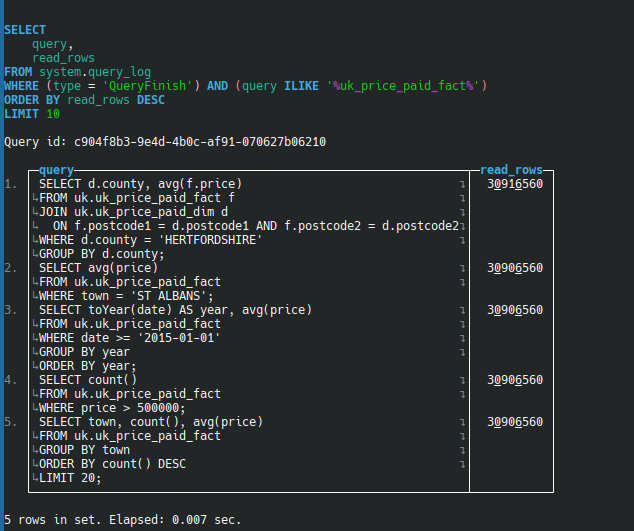
Example Screenshot Showing Heavy Queries
Observation
| Query Pattern | Rows Read |
|---|---|
| WHERE town = ‘ST ALBANS’ | ~30M |
| GROUP BY county | ~30M |
| WHERE price > 500000 | ~30M |
| GROUP BY year | ~30M |
ClickHouse was not skipping granules at all ( it reads the entire 30..million rows )
7. Why ClickHouse Could Not Skip Data
The reason was clear:
- Filters used non-primary key columns
- No data skipping indexes existed
- GROUP BY queries re-scanned raw data every time
This tells us what optimization to apply and where.
8. When to Use a Data Skipping Index
Use a data skipping index when:
- Column appears frequently in
WHERE - Column is not in ORDER BY
- Queries scan millions of rows
Example: Creating an Index
ALTER TABLE uk.uk_price_paid_fact
ADD INDEX idx_town town TYPE set(1000) GRANULARITY 4;
How a SET Index Works Internally
For each granule, ClickHouse stores the set of unique values of that column
Example granule: ( in real 8192 rows )
| Row | town |
|---|---|
| 1 | ST ALBANS |
| 2 | ST ALBANS |
| 3 | LUTON |
| 4 | LUTON |
Index summary for this block :
{ "ST ALBANS", "LUTON" }
When we Query like,
WHERE town = 'BRISTOL'
ClickHouse checks block’s Index Set:
{“ST ALBANS”, “LUTON”}
Since, BRISTOL not in set
- Granule skipped completely
- Zero disk read
That’s data skipping in action.
9. When to Use a Projection
Use a projection when:
- Same aggregation runs repeatedly
- Queries use
GROUP BY - Aggregation cost dominates execution time
Example Query
SELECT county, avg(price)
FROM uk.uk_price_paid_fact
GROUP BY county;
Creating a Projection
ALTER TABLE uk.uk_price_paid_fact
ADD PROJECTION proj_county_avg
(
    SELECT
        county,
        avg(price)
    GROUP BY county
);
What Happens Internally?
- ClickHouse pre-aggregates data
- Stores it as a separate internal structure
- Skips base table granules entirely
- It reads directly from the Projection
10. Index vs Projection: Decision Rule
| Query Pattern | Optimization method |
|---|---|
| WHERE on non-ORDER BY | Data Skipping Index |
| GROUP BY aggregation | Projection |
| WHERE + GROUP BY | Both |
- Indexes skip irrelevant granules
- Projections skip raw data scans altogether
11. Final Optimization Workflow
- Understand table storage & ORDER BY
- Run analytical queries
- Enable query logging
- Identify heavy queries (
read_rows) - Add data skipping indexes for filters
- Add projections for repeated aggregations
- Validate using logs and
EXPLAIN
Key Takeaway
Optimizing ClickHouse query is about skipping granules, not rows.
Once you understand:
- Granule storage
- Index summaries
- Projection-based skipping
ClickHouse optimization becomes structured and predictable.
What’s Next?
This blog focused on understanding why and when to optimize using data skipping indexes and projections.
In the upcoming blogs, I’ll dive deeper into:
- In upcoming blogs, I’ll deep dive into adding and tuning data skipping indexes and projections, along with before-and-after benchmarks to clearly show their performance impact.
If you want a deeper, hands-on understanding of adding and tuning indexes and projections, stay tuned for the next posts in this series.
Reference
When to use Data Skipping Indexes – https://clickhouse.com/docs/best – practices/use-data-skipping-indices-where-appropriate
When to use Projection – https://clickhouse.com/docs/data-modeling/projections
Understanding Query Optimization Techniques – https://clickhouse.com/docs/cloud/get-started/cloud/resource-tour#query-optimization