Introduction
ClickHouse is designed to process analytical workloads at exceptional speed. One of the key reasons behind this performance is its background merge mechanism, which continuously combines smaller data parts into larger ones. These merges improve query performance, reduce the number of files on disk, and optimize data storage without interrupting ongoing queries.
For most tables, ClickHouse performs a Horizontal Merge, where all columns are processed together. However, when dealing with wide tables containing hundreds of columns, this approach can consume a significant amount of memory. To address this challenge, ClickHouse introduces Vertical Merge, an optimization that processes columns in multiple stages instead of all at once.
In this article, we'll explore how Vertical Merge works, why it was introduced, how ClickHouse decides when to use it, and how it helps reduce memory consumption during background merge operations.
Prerequisites
Before exploring Vertical Merge, it's helpful to understand a few core ClickHouse concepts:
- MergeTree tables
- Data parts
ORDER BY(sorting key)- Background merge operations
If you're already familiar with these concepts, you can jump directly into the merge process.
Understanding Background Merges
ClickHouse stores data in immutable data parts. A data part is called immutable because once it is written to disk, ClickHouse never modifies it directly. Instead, when optimization is needed, ClickHouse creates a new merged part and removes the old ones after the merge completes successfully.
Since every INSERT operation creates a new data part, a busy table can quickly accumulate hundreds or even thousands of small parts. Having too many parts increases storage metadata, makes background maintenance more expensive, and can negatively impact query performance.
To keep storage efficient and maintain fast query execution, ClickHouse continuously performs background merges that combine smaller parts into larger ones.
For example, if you insert data five times into the same MergeTree table, ClickHouse creates five separate data parts. These parts are stored independently until the background merge process combines them into a larger part.
INSERTS

Part A
Part B
Part C
   │
   ▼
Background Merge
   │
   ▼
Merged Part
During a merge, ClickHouse:
- Reads multiple source parts.
- Combines and sorts rows according to the table's sorting key.
- Applies engine-specific processing.
- Writes a new merged part.
- Removes the old parts after the merge completes successfully.
Horizontal Merge vs Vertical Merge
ClickHouse supports two approaches for merging data parts.
| Horizontal Merge | Vertical Merge |
|---|---|
| Processes all columns together | Processes key columns first, then remaining columns separately |
| Higher memory usage | Lower memory usage |
| Best for narrow tables | Best for wide tables |
| Simpler merge process | Multi-stage merge process |
| Faster for smaller tables | Better scalability for large tables |
Horizontal Merge remains the default merge strategy in ClickHouse because it performs efficiently for most workloads. Vertical Merge is used only when ClickHouse determines that processing all columns together would require excessive memory, making a staged merge more efficient.
Why Was Vertical Merge Introduced?
Horizontal Merge works efficiently for tables containing a relatively small number of columns. However, as analytical datasets grow wider with hundreds of columns and millions or even billions of rows, the amount of data that must be processed during a merge also increases. Processing every column simultaneously can consume a considerable amount of memory.
Imagine an analytics table containing:
- 250 columns
- Millions of rows
- Several large
String,Array, orJSONcolumns - Continuous data ingestion
A traditional merge must read data from every column at the same time. As the number of columns increases, memory consumption grows significantly.
Instead of loading every column simultaneously, Vertical Merge divides the work into smaller stages, allowing ClickHouse to process only a small portion of the data at a time. This dramatically reduces peak memory usage while still producing the same final merged part.
How Vertical Merge Works (Example)
Before understanding the internal workflow, let's look at a simple example. We'll use two small data parts to demonstrate how ClickHouse performs a Vertical Merge. The same process is used internally for much larger datasets.
Let's assume we have two data parts that need to be merged.
Part 1
| id | city | sales |
|---|---|---|
| 1 | Chennai | 500 |
| 3 | Delhi | 700 |
Part 2
| id | city | sales |
|---|---|---|
| 2 | Mumbai | 600 |
| 4 | Pune | 900 |
Assume the table is created with:
ORDER BY id;This means the final merged data must be ordered by the id column.
Step 1: Read Only the Sorting Key
Every MergeTree table defines a sorting key using the ORDER BY clause. During a Vertical Merge, ClickHouse first reads only the sorting key columns to determine the correct row order for the merged part, instead of loading every column (id, city, and sales) into memory at once.
Part 1
| id |
|---|
| 1 |
| 3 |
Part 2
| id |
|---|
| 2 |
| 4 |
At this stage, ClickHouse ignores the city and sales columns.
Step 2: Determine the Correct Row Order
Using the id values, ClickHouse determines how the rows should appear in the final merged part.
| Final Position | id |
|---|---|
| 1 | 1 |
| 2 | 2 |
| 3 | 3 |
| 4 | 4 |
Internally, ClickHouse remembers where every row belongs. This information is called a row mapping.
Once the row mapping has been created, ClickHouse no longer needs to recalculate the row order while merging the remaining columns, making the process both efficient and memory-friendly.
You can think of it as a set of instructions saying:
- Row from Part 1 → Position 1
- Row from Part 2 → Position 2
- Row from Part 1 → Position 3
- Row from Part 2 → Position 4
This mapping is created only once and is reused while processing every remaining column. It exists only for the duration of the merge operation and is discarded after the final merged part has been written.
Step 3: Merge the Remaining Columns
Now ClickHouse starts processing the remaining columns one at a time.
Merge the city column
Part 1
| city |
|---|
| Chennai |
| Delhi |
Part 2
| city |
|---|
| Mumbai |
| Pune |
Using the row mapping:
| city |
|---|
| Chennai |
| Mumbai |
| Delhi |
| Pune |
Merge the sales column
Part 1
| sales |
|---|
| 500 |
| 700 |
Part 2
| sales |
|---|
| 600 |
| 900 |
Using the same row mapping:
| sales |
|---|
| 500 |
| 600 |
| 700 |
| 900 |
Notice that ClickHouse never loads every column into memory simultaneously. Instead, it processes one column (or a small group of columns) at a time using the previously created row mapping.
Step 4: Build the Final Merged Part
Finally, ClickHouse combines all processed columns into a single merged part.
| id | city | sales |
|---|---|---|
| 1 | Chennai | 500 |
| 2 | Mumbai | 600 |
| 3 | Delhi | 700 |
| 4 | Pune | 900 |
The old data parts are then removed automatically.
Why Does This Save Memory?
Imagine a table with 500 columns.
Horizontal Merge
ClickHouse tries to process all 500 columns together.
Memory

id
city
sales
price
quantity
...
500 columns
This requires a large amount of RAM.
Vertical Merge
ClickHouse processes one column at a time.
Memory

id
↓

city
↓

sales
↓

price
↓

quantity
At any moment, only a small portion of the data is in memory, which significantly reduces peak memory usage.
Vertical Merge Workflow
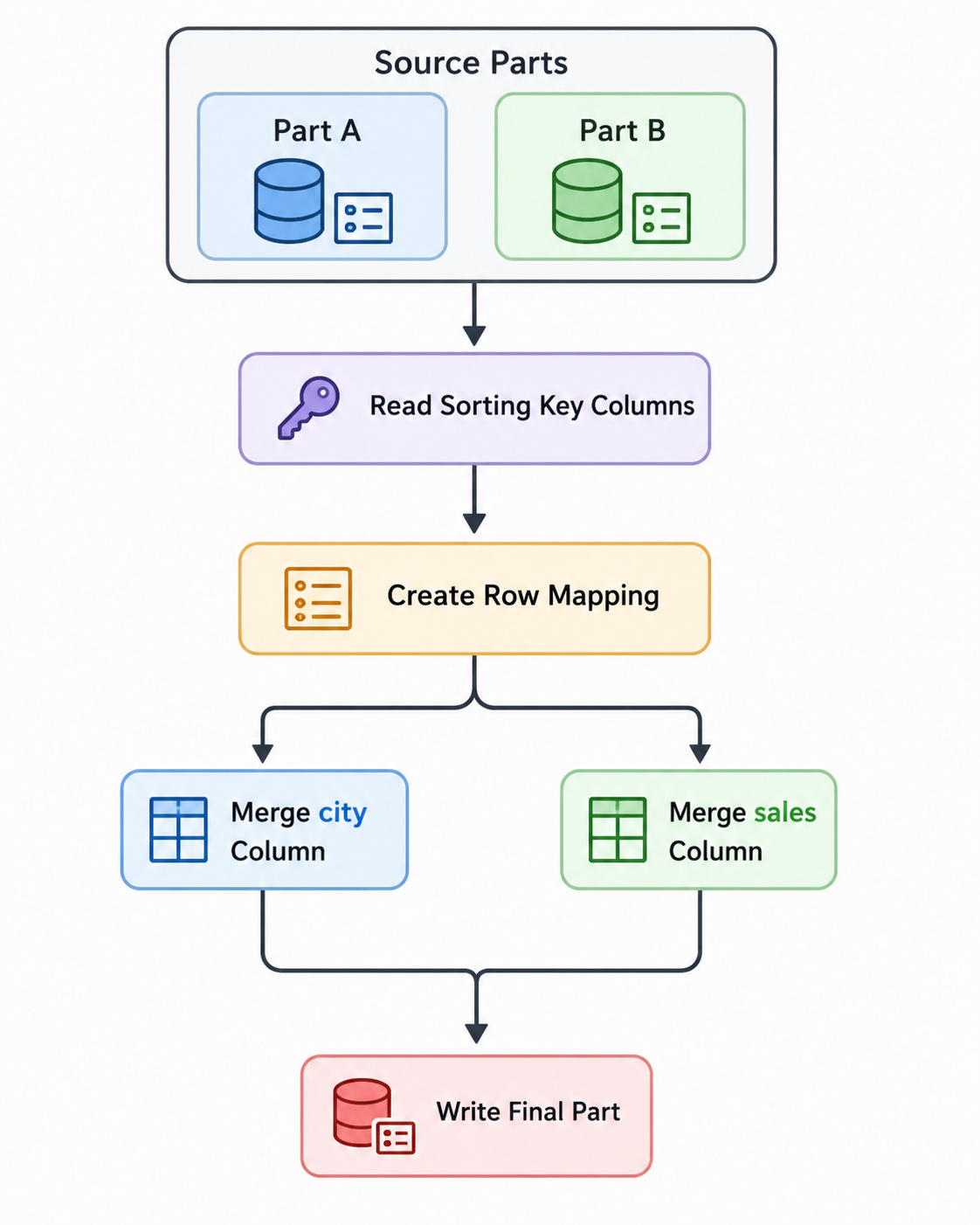
The workflow above illustrates how ClickHouse first determines the correct row order using the sorting key columns, creates a temporary row mapping, and then merges each remaining column independently before writing the final merged part. This staged approach significantly reduces peak memory usage compared to processing all columns simultaneously.
Why Vertical Merge Uses Less Memory
The primary advantage of Vertical Merge is that it avoids loading every column into memory simultaneously.
With a Horizontal Merge, all columns from every source part are processed together, resulting in higher peak memory usage.
With a Vertical Merge, only the sorting key and one column (or a small group of columns) are processed at a time. This significantly lowers memory requirements and reduces pressure on the server, particularly for wide tables.
Although the total amount of data being merged remains the same, the workload is divided into smaller, more manageable steps.
This approach is particularly beneficial for wide tables containing large String, Array, JSON, or Map columns, where loading every column simultaneously could consume a significant amount of RAM.
When Does ClickHouse Use Vertical Merge?
ClickHouse automatically determines whether a Vertical Merge is more efficient than a Horizontal Merge.
The decision is based on several internal factors, including:
- Number of columns in the table
- Number of rows being merged
- Size of the source data parts
- Estimated memory required for the merge
- MergeTree configuration thresholds
If ClickHouse estimates that a Horizontal Merge would consume excessive memory, it automatically switches to a Vertical Merge.
In most production environments, users do not manually choose between Horizontal Merge and Vertical Merge. ClickHouse evaluates the workload and selects the most appropriate merge strategy automatically.
Note: Vertical Merge optimizes the merge process itself. It does not directly improve
SELECTquery performance. However, by reducing memory usage during background merges and keeping data parts well organized, it contributes to better long-term system stability and consistent query performance.
Advantages of Vertical Merge
- Reduces peak memory usage during merges.
- Improves scalability for wide tables.
- Handles large
String,Array, andJSONcolumns more efficiently. - Reduces memory pressure on busy servers.
- Allows larger merge operations to complete successfully.
- Minimizes the impact of background merges on running queries.
- Improves merge stability for memory-constrained environments.
Limitations
Although Vertical Merge is highly effective for wide tables, it is not always the optimal choice.
Some limitations include:
- Additional processing stages introduce a small amount of overhead.
- Narrow tables generally perform better with Horizontal Merge.
- Small merge operations usually gain little benefit.
- Overall performance depends on table design and workload characteristics.
Monitoring Merge Activity
ClickHouse provides several system tables that help monitor background merges.
View Active Merges
SELECT
    database,
    table,
    elapsed,
    progress,
    num_parts
FROM system.merges;
This query provides information such as merge progress, elapsed time, source parts, and overall merge progress.
View Active Parts
SELECT
    partition,
    name,
    rows,
    bytes_on_disk
FROM system.parts
WHERE active;
This helps you understand how data parts are organized after merge operations.
View Merge History
SELECT *
FROM system.part_log
WHERE event_type = 'MergeParts'
ORDER BY event_time DESC;
The system.part_log table records completed merge events, making it useful for troubleshooting and performance analysis.
Best Practices
To maximize the effectiveness of Vertical Merge:
- Choose an appropriate
ORDER BYkey to support efficient merges. - Batch
INSERToperations whenever possible to reduce the number of small data parts. - Monitor long-running merges using
system.merges. - Ensure sufficient free disk space, as ClickHouse creates a new merged part before removing the old ones.
- Regularly review merge performance alongside CPU, memory, and disk utilization.
- Avoid creating unnecessarily wide tables unless required by your workload.
Real-World Use Cases
Vertical Merge is particularly useful for workloads that involve large, wide tables where memory-efficient merges are important.
| Workload | Why Vertical Merge Helps |
|---|---|
| IoT sensor data | Tables often contain hundreds of metric columns. |
| Log analytics | Large String columns increase memory usage during merges. |
| Clickstream analytics | Event tables typically have wide schemas. |
| Financial market data | Large analytical datasets benefit from reduced merge memory. |
| Time-series platforms | Multiple metrics are stored across numerous columns. |
| Data warehouses | Wide schemas containing JSON or Array columns are merged more efficiently. |
Key Takeaways
- Every
INSERTcreates a new immutable data part. - Background merges combine small parts into larger ones.
- Horizontal Merge processes all columns together.
- Vertical Merge first merges sorting key columns and then processes remaining columns separately.
- Vertical Merge significantly reduces peak memory usage.
- ClickHouse automatically decides when to use Vertical Merge.
Conclusion
Vertical Merge is an intelligent optimization within ClickHouse that improves the efficiency of background merge operations for wide tables. By separating the processing of sorting key columns from the remaining columns, ClickHouse significantly reduces memory consumption without affecting the correctness of the final merged data.
Although Vertical Merge works automatically behind the scenes, understanding its workflow helps database administrators and data engineers interpret merge behavior, troubleshoot performance issues, and design schemas that scale efficiently as datasets continue to grow.
References
-
ClickHouse Documentation – MergeTree Table Engine
https://clickhouse.com/docs/engines/table-engines/mergetree-family/mergetree -
ClickHouse Documentation – Part Merges
https://clickhouse.com/docs/en/merges -
ClickHouse Documentation – MergeTree Settings
https://clickhouse.com/docs/operations/settings/merge-tree-settings